
The annual commitment is not a discount you take for free: at every Business edition it costs exactly the same as ten months of flexible service. If you are confident the seat will still be yours in ten months, commit and keep the cheaper rate. If you are testing a business, sharing a seat with a contractor or might switch tools, pay the higher flexible rate and keep the right to stop.
Editorial research checked September 11, 2026 against Google Workspace Admin Help. Prices below are the USD list prices Google publishes in that comparison; your country, currency, tax and any promotion may differ. This article contains no affiliate links.
Two decisions that people merge into one
At the Google Workspace checkout you make two separate choices. The first is the edition: Business Starter, Standard or Plus, which decides storage, meeting size and administrative features. The second is the payment plan: Flexible, where you are billed monthly for the accounts you actually have, or Annual/Fixed-Term, where you commit to a year or more at a lower rate.
Most comparison articles cover the first decision and skip the second. For a one-person business the second one carries the real risk, because it is the one you cannot undo mid-term. Google documents the Business editions as “Professional office tools for up to 300 users”, with pooled storage of 30 GB, 2 TB and 5 TB per user and Meet capacity of 100, 150 and 500 participants. Pick the edition on those facts. Then read the rest of this article for the plan. Source: Google Workspace business editions.
The list prices, side by side
| Edition | Flexible | Annual / Fixed-Term | Annual, per year |
|---|---|---|---|
| Business Starter | $8.40 | $7.00 | $84 |
| Business Standard | $16.80 | $14.00 | $168 |
| Business Plus | $26.40 | $22.00 | $264 |
Source: Google’s Flexible and Annual/Fixed-Term comparison, last updated September 10, 2026. Google notes on the same page that “Annual Plan payment options vary depending on your region, your subscription type, and how you purchased your subscription” and that it “occasionally offers country-based discounts for new customers.” When we opened the public pricing page from Japan it showed yen prices and a limited-time introductory offer, so treat the table above as the reference list, not as the number you will be charged.
One seat, twelve months
Hold the plan and the rate constant for a year and the arithmetic is simple.
| Edition | Flexible, 12 months | Annual commitment | Difference |
|---|---|---|---|
| Business Starter | $100.80 | $84.00 | $16.80 |
| Business Standard | $201.60 | $168.00 | $33.60 |
| Business Plus | $316.80 | $264.00 | $52.80 |
The saving is 16.7% of the flexible total, which matches the “save 16%” line Google uses in its own marketing. In absolute terms, for one person on Business Standard, the commitment is worth about thirty-four dollars a year. That is the number to weigh against the flexibility you are giving up, and for many solo operators it is smaller than they assumed.
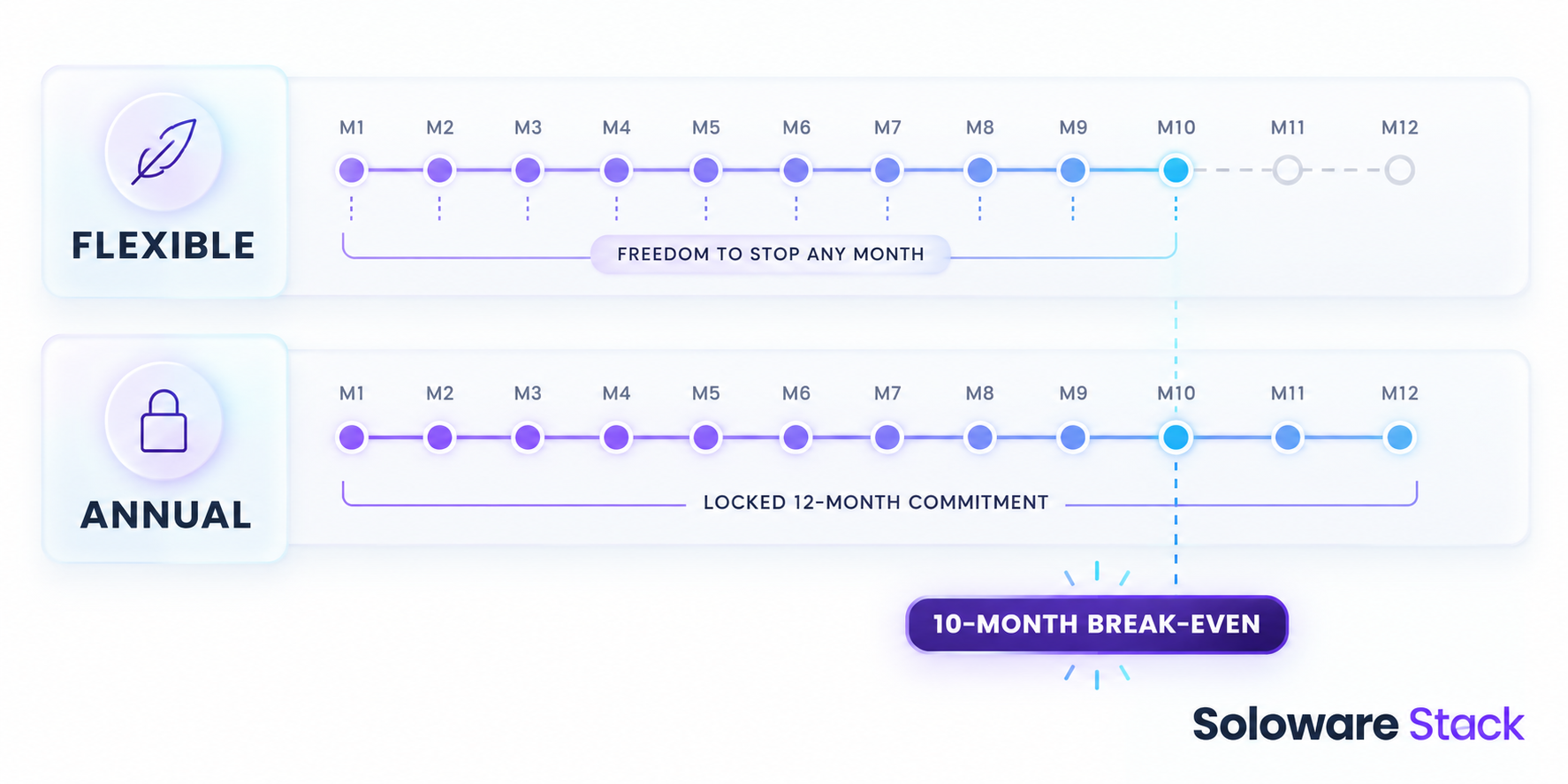
The break-even is ten months, at every edition
Because the annual rate is five sixths of the flexible rate, the yearly commitment costs the same as exactly ten months of flexible service. Eighty-four divided by 8.40 is ten. One hundred and sixty-eight divided by 16.80 is ten. Two hundred and sixty-four divided by 26.40 is ten.
That single number makes the decision concrete. If you stop after nine months, flexible was cheaper, because on the annual plan you still owe the full commitment. If you keep the seat for a full year, the commitment wins by the amounts in the table above. So the question is not “will I use Google Workspace?” but “am I confident that this specific seat still exists in ten months?”
This is licence arithmetic only. It excludes tax, migration effort, the cost of moving your email elsewhere and any promotional rate that expires part-way through the term.
What the commitment actually commits you to
Google is explicit about three consequences, and they are the reason the cheaper rate exists.
- You cannot shrink the subscription mid-term. On the Annual/Fixed-Term plan, “You can’t remove licenses and lower your subscription price until it’s time to renew your contract.” Until renewal, you pay for every licence you bought.
- Cancelling early does not stop the bill. “If you cancel your subscription before the contract is over, you’re still responsible for the full value of the commitment”, and Google states that any unpaid balance is charged immediately.
- Adding a seat extends the exposure. Licences added mid-term are prorated for the remainder of the billing period, and then they are locked in like the rest until renewal.
Sources: Google’s Annual/Fixed-Term plan page and the plan comparison above, both last updated September 10, 2026. Renewal notice periods and the rules for switching between plans were not stated on the pages we checked, so confirm those in your own subscription before committing.
The Flexible plan is the mirror image. Google describes it as billed “monthly for each user account”, with the ability to “add or remove user accounts at any time”, prorated, and to “cancel your subscription at any time without penalty.” Source: Flexible Plan.
The contractor seat is where this gets expensive
The one-seat comparison understates the risk, because the expensive mistake is usually the second seat. Suppose you commit annually in January and add a licence in April for a contractor who finishes in June. On the annual plan that licence stays on your bill until renewal, so you pay for roughly six months of a seat nobody uses. On the flexible plan you remove the account and the charge stops the following month.
If your headcount genuinely moves up and down, the honest comparison is not “flexible costs 20% more” but “flexible costs 20% more on the seats I actually keep, and nothing on the seats I drop.” Write down how many seats you are sure about for the next ten months. Commit to those, and treat anything above that number as the case for staying flexible.
A decision table for uncertain headcount
| Your situation | Reasonable choice | Why |
|---|---|---|
| Established solo practice, one seat, no plans to move | Annual commitment | You clear the ten-month break-even comfortably and bank the 16.7%. |
| New business in its first year, outcome uncertain | Flexible | Cancelling in month six costs you six months, not twelve. |
| Evaluating Google Workspace against another suite | Flexible | A migration decision inside the term would leave you paying for both. |
| Seats that come and go with projects | Flexible for the variable seats | Removed accounts stop costing money; committed licences do not. |
| Stable core plus occasional help | Compare both before adding the extra seat | Any seat added mid-term on an annual plan is locked until renewal. |
Check your own contract, reseller arrangement and tax position. Check the subscription page in your own Admin console before you change anything.
Before you choose at checkout
- Pick the edition on features, not on price: storage, Meet size, shared drives and, on Business Plus, Vault and advanced endpoint management.
- Count the seats you are confident about for the next ten months. That is your commitment candidate.
- Check the currency and any promotional rate actually shown to you, and note when the promotion ends.
- Decide what happens to email if you leave: exporting mail and moving a domain is work you have not priced.
- Record the renewal date somewhere you will see it, because reducing licences is only possible at renewal.
If you are also reviewing the rest of your one-person stack, our Notion vs Airtable comparison covers the workspace side of the same budget.
Frequently asked questions
Is the annual plan always cheaper?
Only if you keep the licence for at least ten months. Below that, the flexible plan costs less in total, because early cancellation on the annual plan still leaves you responsible for the full commitment.
Can I reduce licences on the annual plan if work dries up?
No. Google states that licences can be removed only at renewal, and that you pay for all purchased licences until then.
Can I pay monthly on the annual plan?
Google says payment options vary by region, subscription type and how you purchased. Monthly payment on an annual commitment is offered in some cases, but it is still a commitment, not a rolling month.
Do these USD prices apply in my country?
Not necessarily. When we opened the public pricing page it was served in yen with a limited-time introductory offer. Use the table as the reference list and confirm your own checkout price.
Does the plan affect which features I get?
No. Features follow the edition, not the payment plan. Flexible and annual buy the same Business Starter, Standard or Plus.
Sources and method
Plan rules and prices were checked against the Google Workspace Admin Help pages linked beside each claim on September 11, 2026, and those pages displayed a September 10, 2026 update date. The twelve-month totals and the ten-month break-even are our arithmetic on those list prices, not figures published by Google. This article is not tax or contract advice. Prices and plan terms change; recheck before you commit.
Read next